
Visionix LAN* Autorefractor, Keratometer, Tonometer - WINK Machine Integration Guide
Important Note:
This guide is for following Visionix LAN* Connection Based Auto Refractors, Keratometers, and Tonometers: Visionix VX-90, VX-110, VX-118, VX-120, VX-130 and VX-650
Prerequisites: Client Side Requirements:
- Make sure the server isn’t interfering with WINK ( firewall, antivirus….)
- The PC should be configured to accept SMB1 protocol
- Provide the IP address of the server
- Provide the username and password associated to the PC running machine interface
Prerequisites: Distributor/Manufacturer Side Requirements:
- Shared output folder for the device should be set up
- The device should be configured according to the shared output folder
- Upon exporting the data from the device, the data should be populated in the output shared folder meaning the connection between the shared folder and the device should be set up.
- Output shared folder should be accessible from the PC running the machine interface.
- Shared folder path and access info containing the output xmls should be shared to the WINK team.
Distributor/Manufacturer Side Configuration Tasks:
- Setup shared output folder.
- Configure the device with the shared output folder info
- Test the device connection with the shared output folder
- Make sure the PC running the machine interface has access to the shared output folder
- Share access and folder path information to the WINK team
Other Tasks from WINK Side:
- Create a user that has access to nothing except launching the machine interface without a auto log-out
- Create room/s in WINKpms, if not created
WINK Side Configuration (Sample):
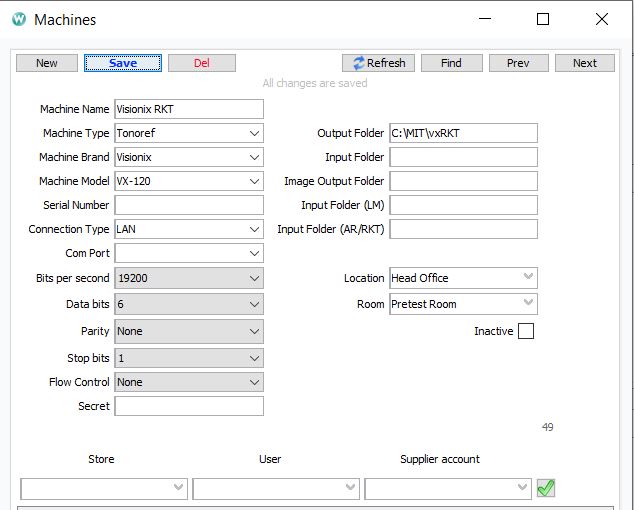
Explanation for Setup:
Machine Name: (Recommended) Some Descriptive Name (E.g. Machine Brand, Model, Location, Room)
Machine Type: (Required) Tonoref or AR
Machine Brand: (Required) Visionix
Machine Model: (Required) Depending upon the device model
Connection Type: (Required) LAN
Output Folder: (Required) Depending upon the output shared folder path given by Distributor/Manufacturer representative
Location: (Required) Store Location
Room: (Required) Depending on the room setup. Usually a pretest room.
Machine should be set as active in order to run this driver.
Folder path should be the sub-folder containing the data file. For example, if the folder “RKT” contains another folder called “TXT” and the xml file is inside the “TXT” folder, then the folder path should be “\\shared_folder\RKT\TXT”, not “\\shared_folder\RKT” or “\\shared_folder”.
Required fields are needed for the proper functioning of the machine integration process. If you don’t enter values in those fields and save the configuration, it is possible that you don’t get an error. However, the process might not work as expected.
General Flow of AR/RKT/ ARK Data(Extracting Data From Device To WINK):
- AR/RKT/ARK data is sent from the machine to the shared folder
- These data are retrieved, processed and stored in the WINK database using the Visionix Tonoref driver
- Using EMR app, AR/RKT/ARK data that are stored in database are imported into WINK EMR app
Implementation Details:
- While processing the phoropter structured data, the driver only looks for the “.xml” and “.hst” extensions. Files with any other extension are ignored.
- For date and time, it will try to use the time and date mentioned in the xml. If no date and time are specified in the data xml, then current time is set for the data.
Comments